Exoscale Marketplace Integration
To integrate services from Servala into the Exoscale Marketplace, we provide an Exoscale-specific Open Service Broker (OSB) API endpoint to provision Servala organizations and enable access to the service plans. The Servala web portal is used by the end-user of Exoscale to provision and manage services.
When an Exoscale customer enables a service on the Exoscale Marketplace, access to the service will be enabled on the Servala Web Portal. The Exoscale customer then self-service provisions and configures the service instances via the portal. Disabling a service by an Exoscale customer will disable access to the service on Servala.
Except the Servala portal everything runs on Exoscale premises. Every Exoscale zone will run at least one Worker Cluster which hosts the service instances and a Control Plane (CP).
We regularly send usage data from VSHN Central (Odoo) to Exoscale for invoicing the end-user. Every month an invoice is sent from VSHN to Exoscale for the service usage of the last month.
Terminology
- Open Service Broker API
- "The Open Service Broker API project allows independent software vendors, SaaS providers and developers to easily provide backing services to workloads running on cloud native platforms." See official API spec.
- OSB API
- Abbreviation of Open Service Broker API.
- OSB Specific Terms
-
Excerpt from API spec Terminology:
- Service Offering: The advertisement of a Service that a Service Broker supports.
- Service Plan: The representation of the costs and benefits for a given variant of the Service Offering, potentially as a tier.
- Service Instance: An instantiation of a Service Offering and Service Plan.
- Exoscale Marketplace
- The marketplace of Exoscale enabling the self-service ordering of services from third-party providers.
Architecture
flowchart TB
    exo["Exoscale Marketplace"]
    eu("Exoscale End-User")
    vshn["Servala Exoscale OSB API"]
    vshnccpapi["Control Plane(s)"]
    vshnccpui["Servala Portal"]

    exo-- OSB API -->vshn-- API --> vshnccpui
    eu-- WebUI -->exo
    eu-- WebUI -->vshnccpui-- K8s API --> vshnccpapi
The Servala Web Portal is doing the heavy lifting, while the custom OSB API endpoint is used for Exoscale integration.
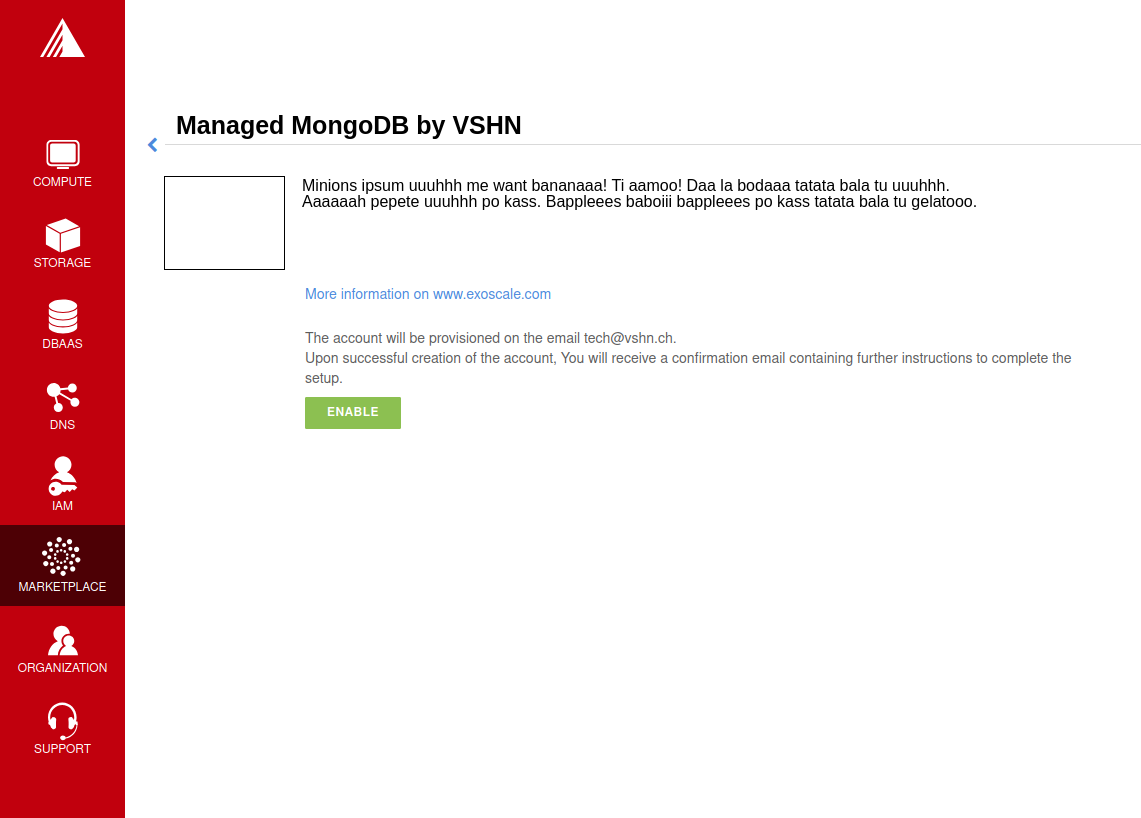
The "Enable" button in the Exoscale Marketplace Portal will:
- Provision an Organization at Servala (if it not already exists) which is tied to Exoscale (
origin=exoscale-marketplace). See Exoscale Organizations. - Give access to the enabled service, ready to be provisioned in the Servala Portal
This Organization will be tied to Exoscale services, it can only see services from Exoscale and only provision at Exoscale premises.
OSB API at Exoscale
Exoscale uses the OpenServiceBroker (OSB) API for service provisioning and deprovisioning with external vendors, that's why we're integrating this way.
The API currently has the following features:
- Service instance provisioning
- Service instance update (plan changes, suspensions, user sync)
- Service instance deprovisioning
- Synchronous requests support
We do not implement the OSB catalog endpoint (GET /v2/catalog): services are listed manually by Exoscale (see Service Listing). All operations are synchronous, asynchronous provisioning is not implemented.
Service Listing
Every service of Servala that is available in the Exoscale Marketplace is individually listed in the Exoscale Marketplace. Listing in the Exoscale Marketplace is done by Exoscale themselves (they manually add them to their database).
We specifically only list services in the Servala Portal which are enabled on the Exoscale Marketplace when being in the context of an organization with origin Exoscale.
Other available services do get a hint in the Servala Portal that they need to be enabled first on the Exoscale Marketplace to get available for provisioning.
This is done due to the fact that there is no backchannel from the Servala Portal to the Exoscale Marketplace. Would we allow to provision other services than enabled in the Exoscale Marketplace, there would be a mismatch, also from billing and legal perspectives.
OSB Plans and Services
There are a few OSB plan requirements by Exoscale:
- An OSB API service must match one product on the Exoscale marketplace.
- An OSB API plan should be setup for each published plan for that product.
- An additional technical plan must be available for managing suspensions of end user organizations.
OSB services and plans, including their mapping to specific configurations are configured in the Portal database.
Exoscale Organizations
When an Exoscale user clicks on the green "Enable" button on a service offering page, the onboarding flow is triggered in the Servala Portal.
Onboarding
sequenceDiagram
    autonumber
    actor EU as Exoscale User
    participant EP as Exoscale Portal
    participant VCA as Servala OSB API
    participant CCP as Servala Portal

    EU->>EP: Enable VSHN Service
    EP->>VCA: OSB API "PUT"
    VCA-->>CCP: Create "Organization"<br/>(if not exist)
    CCP-->>EU: Send invitation to organization<br/> via E-Mail (if new Organization)
    VCA->>CCP: Enable Service Plan
    CCP->>EU: Send Service Welcome Mail
    VCA->>EP: OSB API Confirmation
    Note over VCA,EP: see return codes below
    EP->>EU: Confirmation
OSB API Provisioning call from Exoscale to VSHN:
PUT https://[staging.]portal.servala.com/api/osb/v2/service_instances/:instance_id
{
    "service_id": "service-test-guid",
    "plan_id": "plan1-test-guid",
    "organization_guid": "org-guid-here",
    "space_guid": "org-guid-here",
    "parameters": {
        "users": [
            {
                "email":"email",
                "full_name": "full name",
                "role":"owner|tech"
            }
        ]
    },
    "context": {
        "platform": "exoscale",
        "organization_guid": "org-guid-here",
        "space_guid": "org-guid-here",
        "organization_name": "organization-name",
        "organization_display_name": "organization-display-name",
    }
}
service_id: The ID of the service on Servalaplan_id: The ID of the plan on Servalaorganization_guid/space_guid: The Exoscale organization UUIDparameters.users: List of users
200: Service already enabled201: Successfully enabled service
Sources:
In the Servala Portal an Organization is created by the OSB API if it doesn't exist yet.
- Organization Display Name
- The display name is set from the
context.organization_display_namefield, falling back tocontext.organization_nameif the display name is not provided. - Organization Origin
- The organization origin is set to
exoscale-marketplace(hardcoded in the OSB API service) - Invitation
- When the Organization is created the first time, an invitation is sent to the user in the field
parameters.users[0].emailfrom the OSB API.
Suspension
This flow is triggered when an Exoscale organization:
- changes their current plan
- is suspended
- changes the user list on Exoscale side and user sync is turned on
The suspension uses a special "suspension" plan.
sequenceDiagram
    autonumber
    participant EP as Exoscale Portal
    participant VCA as Servala OSB API
    participant CCP as Servala Portal
    participant VSHNEER as VSHNeer

    EP->>VCA: OSB API "PATCH"
    Note over EP, VCA: Set suspension Plan
    VCA->>CCP: Disable Service
    CCP->>VSHNEER: Create Odoo Helpdesk ticket
    VCA->>EP: OSB API Confirmation
    Note over VCA,EP: see return codes below
PATCH https://[staging.]portal.servala.com/api/osb/v2/service_instances/:instance_id
{
"service_id": "service-test-guid",
"plan_id": "suspend",
"parameters": {
"users": [
{
"email":"email",
"full_name": "full name",
"role":"owner|tech"
}
]
}
}
plan_id: The special suspension plan, identified by the literal plan IDsuspend. When the OSB API receives a PATCH withplan_id=suspend, it skips the normal service offering lookup and triggers the suspension handling.
200: Service is disabled
Sources:
When the suspension plan is triggered, the OSB API creates an Odoo Helpdesk ticket with all the information we have (the action, the service, and the instance), so that we can check back with Exoscale what to do. No service is automatically suspended. If it has to happen, we do it manually.
Offboarding
This flow is triggered when an Exoscale organization:
- decides to unsubscribe the product
- suspension is not resolved before 7 days in trial mode, or 30 days outside of trial mode, which triggers a purge of their resources
- decides to close their Exoscale account, or their account is terminated
sequenceDiagram
    autonumber
    actor EU as Exoscale User
    participant EP as Exoscale Portal
    participant VCA as Servala OSB API
    participant CCP as Servala Portal
    participant STAFF as Servala Staff
    participant CP as Control Plane

    EU->>EP: Disable VSHN Service
    EP->>VCA: OSB API "DELETE"
    VCA->>CCP: Create Odoo Helpdesk ticket
    VCA->>EP: OSB API Confirmation
    Note over VCA,EP: see return codes below
    EP->>EU: Confirmation
    STAFF->>CCP: Decommission organization (manual)
    CCP->>CP: Delete service instances
DELETE http://exo-osbapi.vshn.net/v2/service_instances/:instance_id?service_id=service-test-guid&plan_id=plan1-test-guid
200: Service disabled
Sources:
Offboarding is handled manually. The OSB API DELETE call does not delete any service instances by itself: it creates an Odoo Helpdesk ticket with the offboarding action. Servala staff then decommission the organization through the staff section of the portal, which deletes the service instances and namespaces and archives the organization. See Decommission an Organization for the operator runbook.
See also Deprovisioning, which details the single service deprovisioning.
User Synchronization
We don't do user synchronization from Exoscale to Servala.
When user sync is disabled, only the information of the user that made the product purchase will be provided. The information will never be updated.
Instances
Provisioning
Instances aren't directly provisioned via the OSB API. Instead, the service is enabled in the Servala Portal for the organization.
When a service is enabled, a service welcome E-Mail is sent with a link to the service offering page in the portal, where the user provisions the instance.
This flow allows an Exoscale user to have more than one instance per service per Exoscale organization.
Follow-up: pre-filled provisioning link
Today the welcome E-Mail links to the service offering page, where the user fills in the ordering form themselves. The portal already has deeplink and onboarding functionality that can pre-fill the ordering form from query parameters. As a follow-up, we should evaluate reusing this to build a pre-filled provisioning link (encoding the organization, service, and plan) to improve the user experience.
Plan Change
We don't support plan changes on the Exoscale console, all service parameters are configured on our portal on the actual service provisioning. There is only one plan per service, the default plan.
One exception is the "suspension plan" which is described in the suspension flow.
Deprovisioning
See also Offboarding which talks about Organization offboarding and the OSB API flow.
When a user deletes a single service instance in the Servala Portal, we do not send a separate E-Mail per deleted instance. With event-based billing, a deleted instance simply stops accumulating usage, so there is no billing reason to notify the customer per instance.
Disabling a service on the Exoscale side is different: it does not delete the running service instances on Servala. As described in Offboarding, the OSB API DELETE call only creates a Helpdesk ticket, and decommissioning happens manually. Until then, the instances keep running and keep accumulating usage. The customer needs to be informed that disabling on Exoscale leaves their instances running on Servala and that they still need to be deleted there.
Follow-up: notify the customer about still-running instances
When an Exoscale customer disables a service, the matching service instances keep running on Servala (and keep being billed) until staff decommission the organization. We should verify whether the customer is informed about this and told that the instances still need to be deleted on Servala. If this notification is not implemented yet, it needs to be added.
Billing
Billing is handled separately from the OSB provisioning flow described on this page. VSHN reports monthly Servala usage to Exoscale, Exoscale invoices the end-user, and VSHN invoices Exoscale.
See Exoscale Marketplace Billing for the full billing and metering integration.
Resources
- APPUiO Control API Architecture
- APPUiO Invitations
- Crossplane Service Broker (Code) - Crossplane Service Broker (Docs)
- Swisscom Service Broker
- Exoscale Vendor Documentation - Managed Services
- Exoscale Vendor Documentation - Managed Services Billing
- Exoscale Vendor Documentation - Managed Services Provisioning